
Most American office workers and small-team founders do not lose their week to deep strategic projects. They lose 9 to 12 hours every single week copying client details from emails into spreadsheets, chasing overdue invoices, summarizing 45-minute Zoom calls, and retyping the same answers into customer support tickets. Implementing AI workflow automation turns those repetitive handoffs into background pipelines that run on their own while keeping a human in control of final approvals.
Thank you for reading this post, don't forget to subscribe!This guide walks through how AI workflow automation works in plain English, which seven office bottlenecks deliver the fastest return on time, how to calculate the exact dollar savings for a US small business, and the security guardrails required before connecting company data to any model.
Table of Contents
AI workflow automation at a glance
Traditional software automation (like basic rules in an email inbox) follows rigid if-this-then-that logic: if an email arrives with an attachment, save the file to Google Drive. If the sender changes the subject line or pastes the invoice numbers in the body text instead of a PDF, a rigid rule breaks. AI workflow automation combines those reliable software triggers with a large language model that can read unstructured text, extract the exact fields you need, draft a contextual response, and route the result to your database or team chat.
| Component | Traditional Rule Automation | AI Workflow Automation |
|---|---|---|
| Input Data Handled | Strict forms and fixed CSV columns | Emails, PDFs, voice notes, and messy text |
| Decision Logic | Fixed yes/no keyword matching | Intent classification, extraction, and drafting |
| Setup Skill Needed | Basic no-code triggers | No-code visual builders plus clear system prompts |
| Typical Weekly Time Saved | 1 to 2 hours per employee | 8 to 12 hours per employee |
| Monthly Software Cost | $0 to $30 per month | $20 to $90 per month for a 5-person US team |
How AI workflow automation works in a real office
Every working AI workflow automation pipeline has four simple building blocks. Understanding these four blocks lets you build workflows across Zapier, Make, n8n, Microsoft Power Automate, or Google Workspace without writing custom code.
- The Trigger: The event that wakes the pipeline up, such as a new lead submitting a Contact Form 7 inquiry on your website, a client booking a Calendly call, or a vendor sending a PDF bill to `ap@yourcompany.com`.
- The Context Step: Pulling relevant background records before the AI writes a single word, such as looking up the customer’s past orders in HubSpot, QuickBooks, or Airtable.
- The AI Reasoning Step: Passing the raw input and background context to AI agents for work (using Claude, ChatGPT, or Gemini API endpoints) with a strict JSON schema or formatting instruction so the output is predictable every time.
- The Action and Approval Gate: Writing the extracted data into your CRM, posting a one-click Approve/Edit button in Slack or Microsoft Teams, or creating a draft email ready for a two-second human review.
If your team is still typing individual prompts into a browser tab all day, review our guide on how to use ChatGPT for work to standardize your base prompts first, and see our roundup of free AI tools for zero-cost testing accounts.
7 highest-ROI workflows to automate office tasks
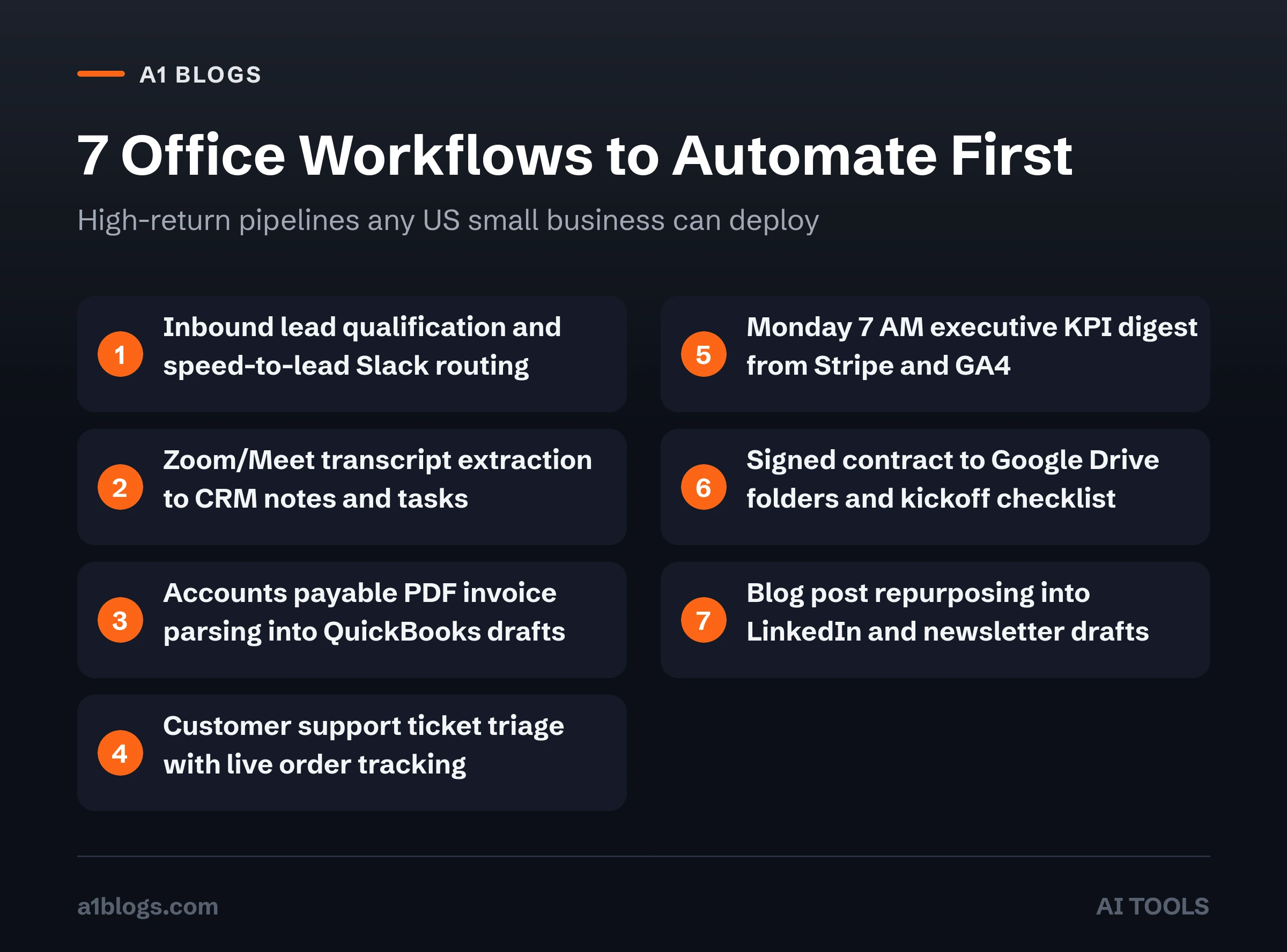
You do not need a six-month enterprise consulting project to see results. Start by setting up one workflow per week from the seven proven office systems below.
1. Inbound lead qualification and instant speed-to-lead routing
When a prospect fills out a quote form on a US service business website, waiting four hours to reply cuts conversion rates by more than half. An AI workflow automation pipeline reads the prospect’s free-text project description the second it arrives, categorizes the budget tier and service line, checks your CRM for existing records, drafts a personalized reply citing their exact project details, and pings the assigned sales rep on Slack with a one-click send button.
Time saved: 2.5 hours per week for a team handling 25 to 40 leads.
2. Meeting transcript to CRM notes and task assignment
Sales reps and project managers often spend 20 minutes after every 30-minute video call typing up bullet points and creating follow-up tasks. Connect your meeting recorder (Fireflies, Fathom, Google Meet, or Zoom) to an automation pipeline that extracts three exact items: client objections, agreed budget numbers, and dated action items. The workflow updates the deal record in HubSpot or Salesforce automatically and assigns tasks in Asana or ClickUp.
Time saved: 3 hours per week per team member.
3. Accounts payable PDF invoice extraction into QuickBooks
Small businesses waste hours manually typing vendor names, invoice dates, line-item totals, and tax amounts from emailed PDF bills into accounting software. When you automate office tasks in accounts payable, a dedicated inbox forwards incoming PDFs to an extraction step that reads every line item, checks the total against the purchase order, flags duplicate invoice numbers, and stages a draft bill in QuickBooks Online or Xero for the bookkeeper to approve.
Time saved: 2 hours per week and near-zero data entry typos.
4. Customer support triage and order-status drafting
Roughly 60% of incoming support emails ask the same four questions: where is my order, how do I reset my account, can I update my billing address, or what is your refund policy. AI agents for work can classify every incoming ticket in Zendesk, Help Scout, or Gmail, query your shipping database for real-time USPS or UPS tracking numbers, and place a complete, accurate draft reply directly inside the support agent’s queue.
Time saved: 3.5 hours per week while cutting first-response times under five minutes.
5. Weekly financial and marketing KPI executive digest
Instead of logging into Google Analytics, Stripe, QuickBooks, and Meta Ads Manager every Monday morning to copy numbers into a slide deck, schedule a Sunday night automation. The workflow pulls last week’s revenue, ad spend, top-performing pages, and overdue receivables, calculates week-over-week percentage changes, and delivers a clean three-paragraph executive brief to your inbox by 7:00 AM Monday.
Time saved: 1.5 hours every Monday morning.
6. Client onboarding document packets and folder creation
The moment a client signs a proposal in DocuSign or PandaDoc and pays their deposit via Stripe, AI workflow automation can create their dedicated Google Drive folder hierarchy, generate a customized kickoff checklist based on the exact scope of work inside the signed contract, invite the client to their shared portal, and schedule the onboarding call link.
Time saved: 45 minutes per new client onboarded.
7. Content repurposing from one core guide to multi-channel drafts
Publishing a thorough guide or case study on your company blog should feed your marketing channels all week. Trigger an automation whenever a new WordPress post goes live so it reads the published article, extracts three concrete statistics or worked examples, and saves tailored LinkedIn posts, an email newsletter draft, and a short video script inside your content calendar. For professionals turning these skills into client services, read our guide on how to make money with AI.
Worked ROI math: what 10 saved hours a week is worth in the US
Many founders underestimate the financial drag of manual admin work because payroll is already a sunk cost. Run the math using actual US hourly compensation numbers:
- Direct labor value: A US operations coordinator, bookkeeper, or account manager earning $65,000 a year plus payroll taxes and benefits costs roughly $38 per hour. Saving 10.5 hours a week equals $399 per week, or $20,748 per year for a single employee.
- Team multiplier: Across a four-person office staff, reclaiming 8 hours per person each week recovers 1,664 productive hours per year, equivalent to adding a full-time employee without paying a second salary.
- Software cost comparison: A mid-tier Make or Zapier plan ($29 to $69/month) plus API token usage ($15 to $25/month) totals roughly $540 to $1,128 per year. That produces an 18x to 38x return on software spend in the first 12 months.
- Tax deductibility: All business software subscriptions and API usage fees count as ordinary business expenses; check our 1099 tax deductions guide to log them properly on Schedule C.
Step-by-step: how to build your first AI workflow automation in 45 minutes
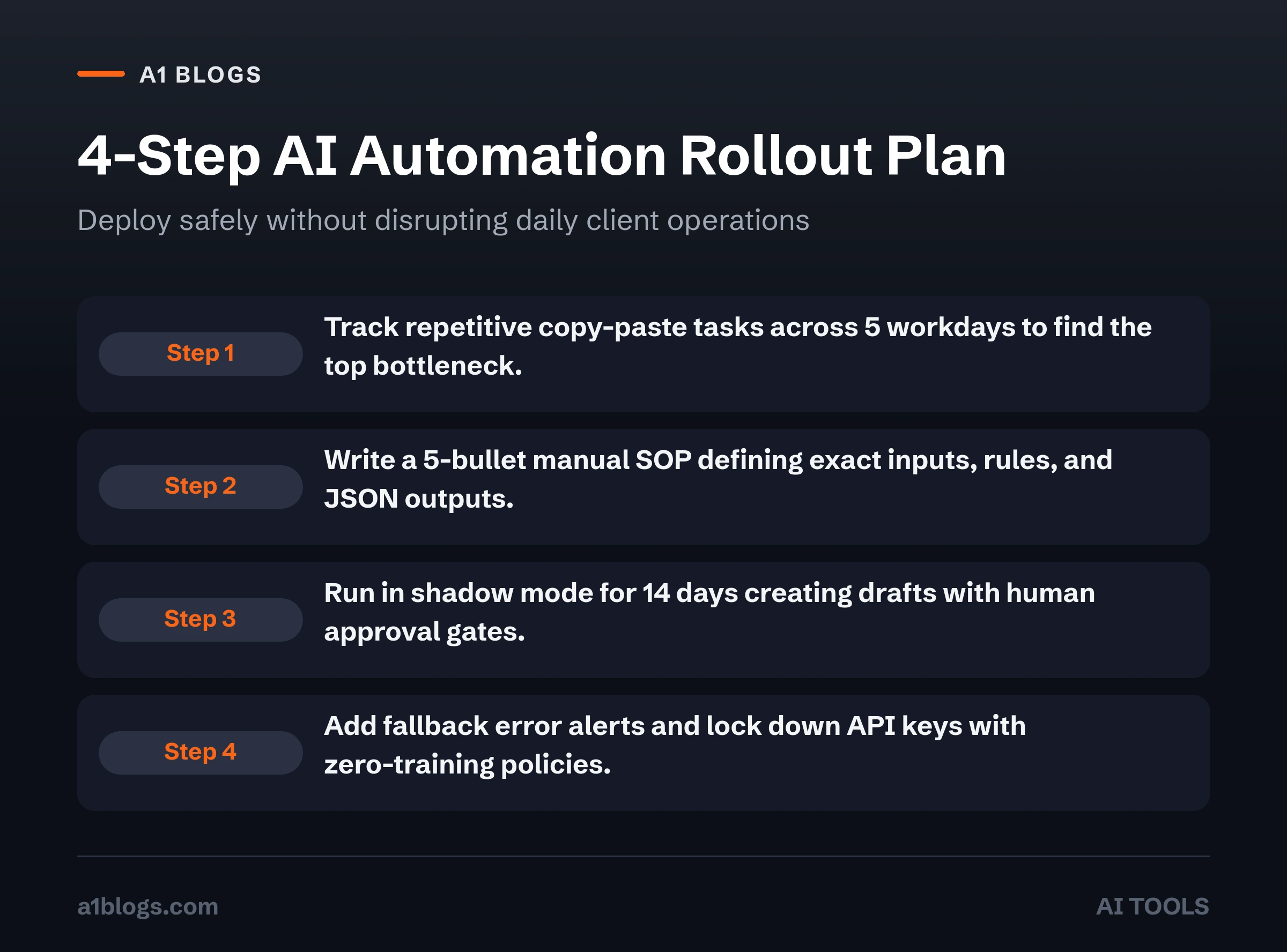
Do not try to automate an entire department on Day 1. Follow this four-step rollout so your first workflow runs reliably without breaking existing operations.
Step 1: Audit one week of repetitive clicks
Have every team member keep a simple tally sheet for five workdays. Whenever someone copies text between two tabs, renames a file, or types a repetitive status email, they write down the task name and how many minutes it took. Pick the single task that happens at least five times a week and follows a clear pattern.
Step 2: Write the manual standard operating procedure (SOP) first
You cannot automate a messy process. Before opening any software tool, write down the exact inputs, the decision rules, and the desired output in five bullet points. If a human assistant could not follow your written instructions, an AI model will guess and make mistakes.
Step 3: Build in shadow mode with human-in-the-loop approval
Configure your workflow so the final step creates a draft (a draft Gmail reply, a draft Slack approval card, or a draft QuickBooks bill) rather than sending directly to customers. Run the pipeline in shadow mode for 14 days. Every time you edit a draft before clicking send, tighten your system prompt so the model learns your exact tone and formatting rules.
Step 4: Add error handling and fallback alerts
APIs occasionally time out or encounter a corrupted PDF. Add an error-routing branch in your automation platform that sends a Slack or email alert to the workflow owner whenever a run fails, along with a direct link to the raw payload so nothing ever vanishes silently.
Security, privacy and compliance rules for US businesses
Connecting company emails, customer records, and financial spreadsheets to external models requires strict data hygiene. Follow the governance principles outlined in the NIST AI Risk Management Framework and U.S. Small Business Administration cybersecurity guidelines:
- Use API or Team/Enterprise tiers, never free consumer chat tabs: Free consumer accounts often allow model providers to use submitted prompts to train future models. Paid API endpoints and business workspaces zero out model training by default under their data processing agreements.
- Strip sensitive PII before sending prompts: Never pass Social Security numbers, full credit card numbers, bank routing credentials, or protected health information (HIPAA data) into a general-purpose prompt. Mask or strip sensitive fields in a pre-processing step first.
- Lock down API keys and OAuth tokens: Store API credentials inside encrypted environment variables, enforce role-based access, and rotate keys every 90 days.
Common mistakes that break AI workflow automation
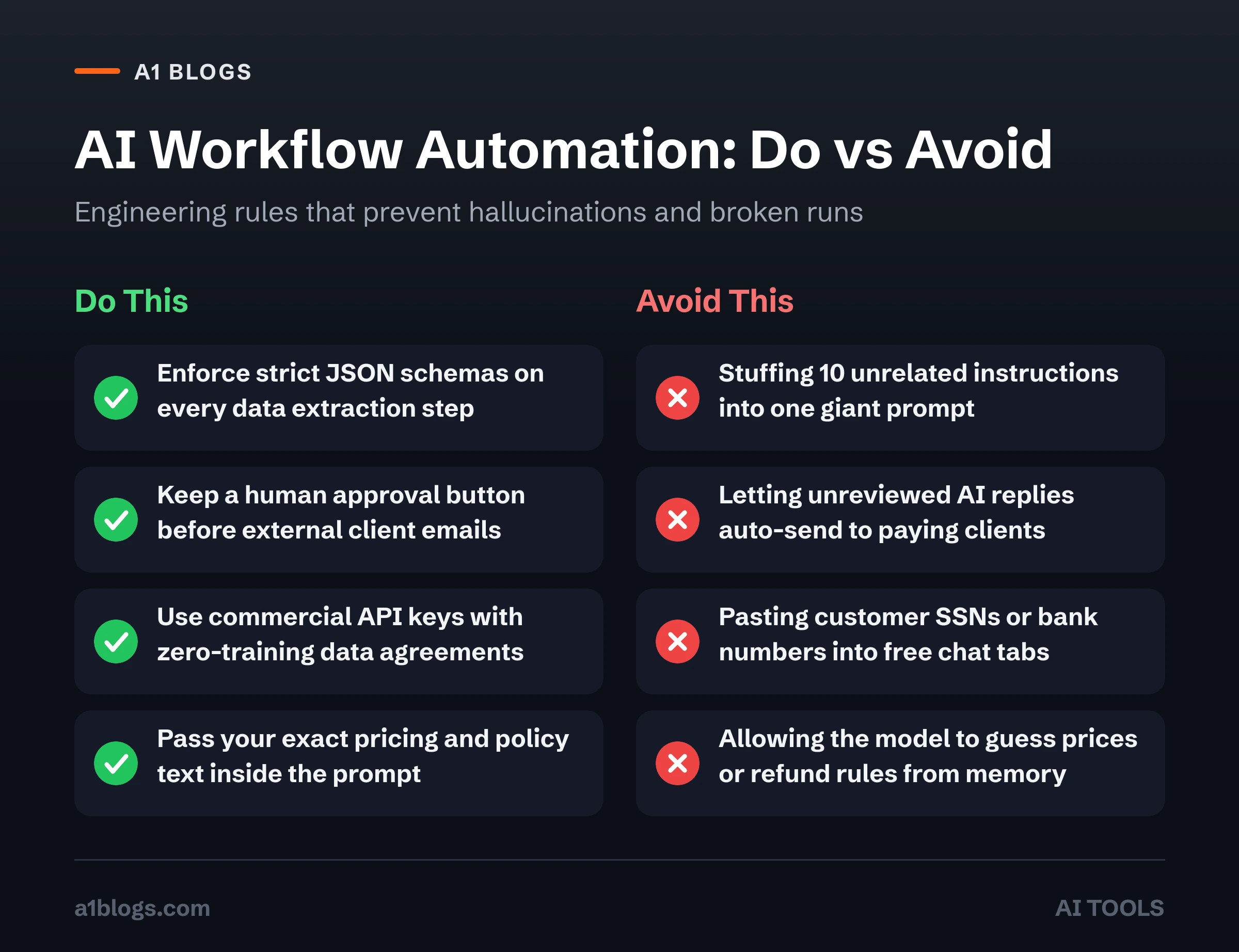
Even experienced operators hit roadblocks when they skip basic engineering discipline:
- Stuffing 10 tasks into one giant prompt: Asking a single prompt to classify an email, extract 14 JSON fields, translate the text, and write a reply causes accuracy to drop sharply. Break complex jobs into two or three small, focused steps.
- Skipping structured JSON outputs: If your next step needs to insert a phone number and budget into a spreadsheet column, enable Structured Outputs (`response_format: json_schema`) so the model is mathematically forced to return valid JSON without conversational chatter.
- Letting AI invent policy or pricing: Never ask an LLM to guess your company’s refund rules or quote prices from memory. Pass your official pricing table or policy snippet directly inside the prompt context and instruct the model to reply “escalate to human” if the answer is not in the provided text.
Frequently asked questions
Do I need to know Python or JavaScript to build AI workflow automation?
No. Modern visual platforms like Zapier, Make, and n8n let you connect triggers, filters, and AI reasoning blocks using drag-and-drop interfaces. Knowing how to read basic JSON key-value pairs helps when mapping fields between apps, and you can learn that in 15 minutes.
How much does AI workflow automation cost per month for a small business?
Most US freelancers and 2-to-10-person teams spend between $25 and $85 per month total. When you access models via direct API billing rather than buying $30/month seat licenses for every single tool, processing 1,000 customer emails or meeting summaries typically costs less than $4 in API tokens.
What is the difference between an AI chatbot and AI workflow automation?
A chatbot sits inside a window waiting for a human to type a question and read the reply. AI workflow automation runs in the background triggered by real business events (like a new invoice, form submission, or calendar booking) and takes structured actions across your software stack automatically.
Will AI workflow automation send embarrassing mistakes to my clients?
Not if you build with a human-in-the-loop approval gate. By configuring your workflows to save drafts in Gmail, HubSpot, or Slack rather than auto-sending externally, a human always gives a two-second thumbs-up before any client sees the message.
Which tool is best for beginners: Zapier, Make, or n8n?
Zapier is the fastest to set up and connects to more than 7,000 business apps in minutes, making it ideal for your first three workflows. Make offers lower per-operation pricing and visual branching for complex multi-step data transformations. n8n is best if you want a self-hosted option with full control over server data.
How do I keep my company data private when using AI agents for work?
Always connect through commercial API keys or business-tier accounts that include a formal Data Processing Addendum (DPA) with zero data retention or zero training guarantees, and avoid pasting raw financial credentials or Social Security numbers into prompts.
Can I connect Google Sheets and Gmail to an AI workflow automation without paying for enterprise plans?
Yes. Both Make and Zapier let you connect standard Google Workspace or Gmail accounts to OpenAI, Anthropic Claude, or Google Gemini API keys on entry-level tiers. You can trigger a run whenever a new row is added to Google Sheets, process the text via API for less than a tenth of a cent, and write the completed output straight back into the adjacent column.
How do I measure whether an AI workflow automation is actually saving money?
Track two numbers before and after turning the pipeline on: average minutes spent per item and total error rate. When you automate office tasks like invoice entry or lead qualification, multiply the hours saved each month by the fully loaded hourly wage of the staff member who previously handled the chore, then subtract your monthly API and automation subscription bill. Even a single AI workflow automation that saves four hours a week typically pays for itself more than ten times over.
What happens if an API goes down while AI agents for work are running?
Modern automation platforms queue incoming webhooks automatically when a downstream model API returns a temporary rate limit or server timeout. Once you configure retry rules with exponential backoff inside Make, Zapier, or n8n, your AI agents for work wait 60 seconds and replay the failed step without losing a single customer form submission or invoice attachment.