Free Microsoft Office is one of the most common searches from students and new freelancers, and it leads to a lot of cracked installers and “activator” tools. You don’t need them. Microsoft offers several legal ways to use Word, Excel and PowerPoint for free, and there are good free alternatives for everything else.
Table of Contents
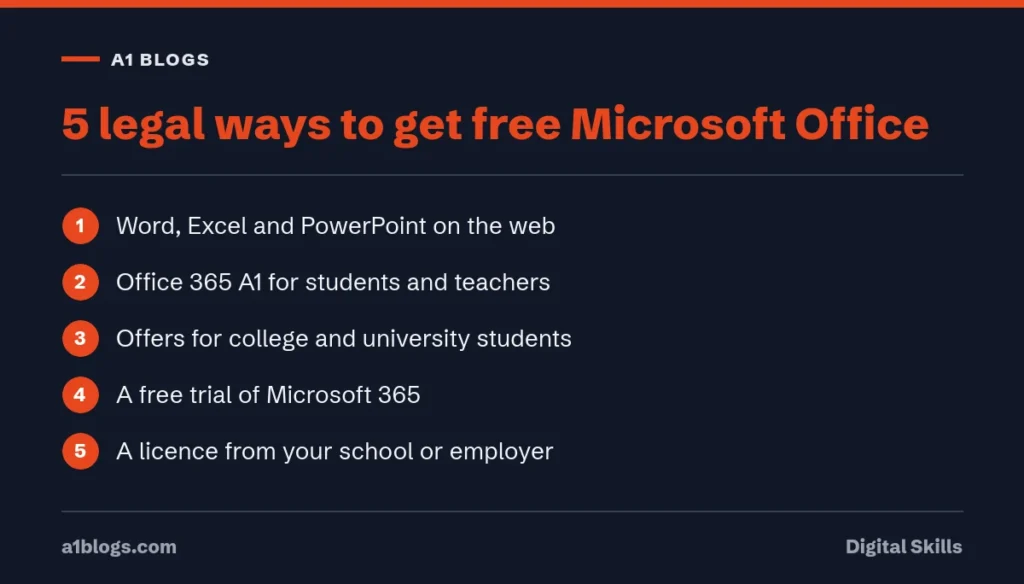
5 legal ways to get free Microsoft Office
1. Use the free web versions
Word, Excel and PowerPoint run in your browser for free with a Microsoft account, and your files save to OneDrive. The web versions cover most everyday work: letters, CVs, assignments, budgets and presentations. Some advanced features, such as complex macros, need the desktop apps.
2. Office 365 A1 for students and teachers
Microsoft says educators and students with an eligible education email address can get Office 365 A1 for free. It includes the web versions of Outlook, Word, Excel, PowerPoint and OneNote. The full desktop apps are not part of the free plan; they come with the paid A3 plan that schools can buy (Microsoft Education).
Verification is often automatic, but Microsoft says it can take up to a month in some cases, and it may re-check eligibility at any time. If the plan ends, the apps become view-only, so keep copies of important files.
3. Offers for college students
Microsoft’s education page also advertises time-limited offers for college students who sign up with their college email, such as 12 months of a premium Microsoft 365 plan. Offers change, so check the current terms and whether your country is included before you rely on one.
4. Free trials of Microsoft 365
Microsoft often offers a free trial of its personal or family plans. Set a reminder before the trial ends and cancel if you don’t want to be charged.
5. Your school or employer’s licence
Many universities and companies already pay for Microsoft 365 and let students or staff install the desktop apps. Ask your IT department before buying anything.
Why cracked Office and activators are risky
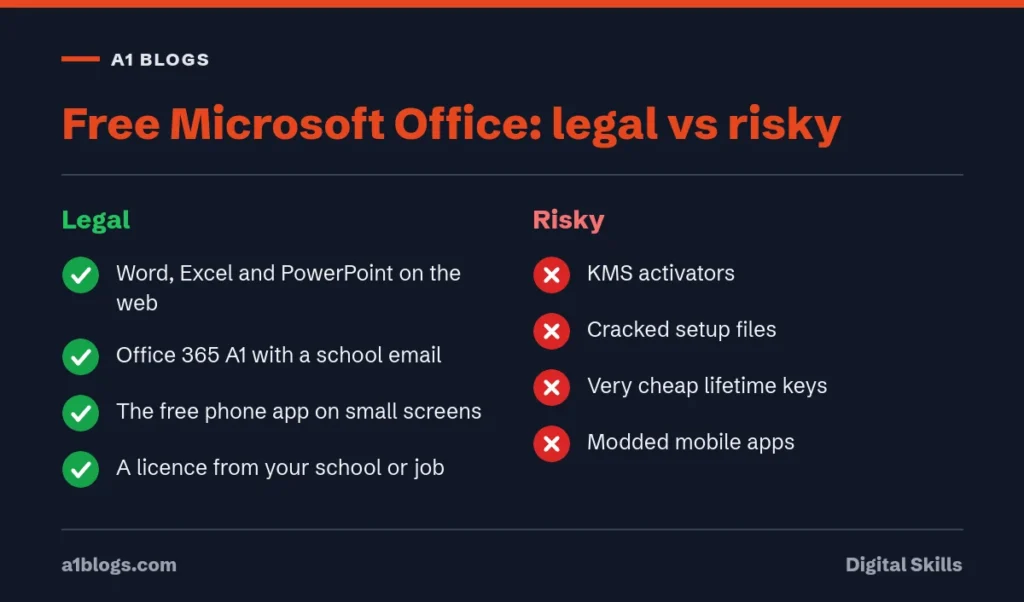
Modified installers and activation tools are a common way to spread malware, because people disable antivirus warnings to run them. They can steal saved passwords, banking details and social media logins. A broken or unlicensed copy can also stop working before an important deadline. If you freelance, our guide to spotting scam texts explains how stolen logins are often used afterwards.
Free alternatives to Microsoft Office
- Google Docs, Sheets and Slides: free with a Google account, work in the browser and open Office files
- LibreOffice: a free, open-source desktop suite that opens and saves Word, Excel and PowerPoint formats
- Mobile apps: the Microsoft 365 app is free to download on phones, though some features need a subscription
For design work, our guide to free Canva Pro covers the legal options. For writing and spreadsheet help, see our guide to using ChatGPT for work, which includes Excel prompts.
Which free option should you choose?
For most students and home users, the web versions of Microsoft Office are enough. Students and teachers with a school email should claim Office 365 A1. If you need desktop features every day, such as advanced Excel or offline work, LibreOffice is free, and a paid plan or your institution’s licence is the safe way to get the full Microsoft apps.
Word, Excel and PowerPoint on the web: what you can and can’t do
The web versions are the easiest route to free Microsoft Office. Sign in with any free Microsoft account at microsoft365.com and you can create and edit Word documents, Excel spreadsheets and PowerPoint presentations in your browser. Files save to OneDrive, which includes 5 GB of free storage.
For most students and office users, the web apps handle everyday work well:
- Writing assignments, CVs and letters in Word, with spelling and grammar checks.
- Spreadsheets with formulas, charts, filters, tables and conditional formatting in Excel.
- Presentations with themes, transitions and speaker notes in PowerPoint.
- Real-time editing with classmates or colleagues, with comments and version history.
They do have limits compared with the paid desktop apps:
- No VBA macros. Excel for the web can open files that contain macros, but it can’t run them.
- Fewer advanced tools. Some data analysis features, advanced layout options in Word and certain PowerPoint effects are only in the desktop apps.
- Internet required. You need a connection to edit, which matters during load-shedding or on weak mobile data.
If your work doesn’t depend on macros or specialist features, the web apps are a legal way to use Microsoft Office free for as long as you like.
Free Microsoft Office on your phone
Microsoft’s mobile app brings Word, Excel and PowerPoint together in one app for Android and iPhone. On phones and small tablets, basic viewing, creating and editing is free with a Microsoft account. Microsoft has long limited free editing to devices with screens of about 10.1 inches or smaller, so larger tablets may need a Microsoft 365 subscription.
The phone app is handy for quick edits, reviewing documents on the move and scanning paper documents into PDF or Word with the camera. For long assignments, pair your phone with a keyboard or switch to a laptop browser.
How students in Pakistan can get Office 365 A1
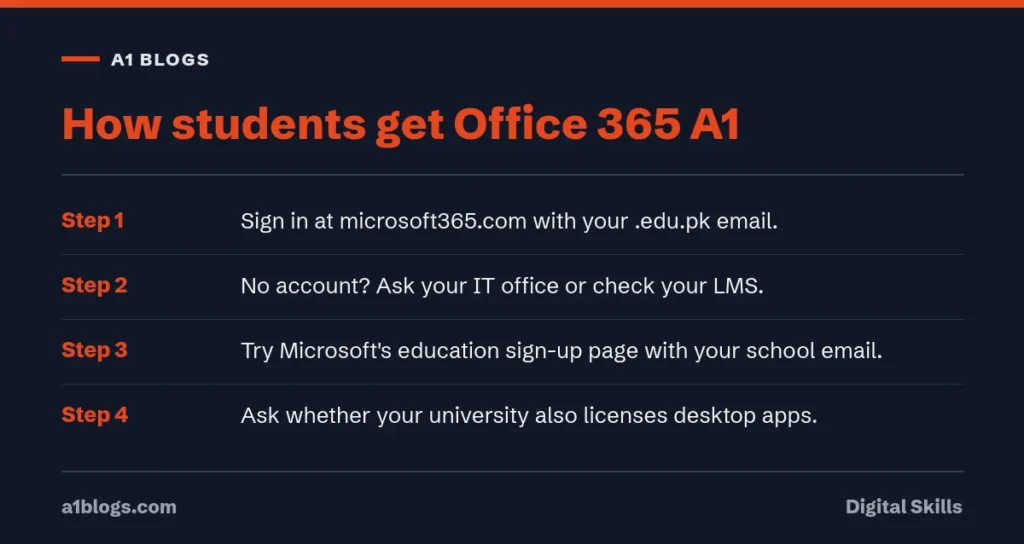
Office 365 A1 is Microsoft’s free plan for schools, colleges and universities. It gives students and teachers Word, Excel, PowerPoint, OneNote, Outlook and Teams in the browser, plus OneDrive storage. Your institution has to be signed up, which many Pakistani universities and colleges already are.
- Check your student email. If your university gave you an email ending in .edu.pk, you may already have an Office 365 A1 account. Try signing in at microsoft365.com with it.
- Ask the IT office or check your LMS. Many universities send login details at enrolment, and some post guides on their student portal.
- Try Microsoft’s education sign-up page. Enter your school email address. If your institution is registered, you can create an account straight away.
- Ask about desktop apps. Office 365 A1 is web-based, but some institutions also licence the full desktop apps for students. Your IT office will know.
When you graduate, the account usually ends after a set period. Download your files to a personal drive before then.
Microsoft 365 plans if you decide to pay
If you need the desktop apps, macros or more storage, Microsoft 365 is sold as a subscription. Microsoft sets prices by country, so check the current price in Pakistani rupees on its website or in the Microsoft Store.
- Microsoft 365 Basic adds extra OneDrive storage and ad-free Outlook, but not the desktop apps.
- Microsoft 365 Personal is for one person and includes the desktop apps on a PC or Mac, plus more storage.
- Microsoft 365 Family covers up to six people, each with their own storage and apps. Sharing a Family plan with your household is allowed and often the cheapest legal way to get the full apps.
Watch out for very cheap “lifetime” Microsoft 365 or Office keys sold online. Many are resold volume licence keys or stolen accounts that stop working, and some sellers disappear once the key is blocked.
Make free alternatives work with Microsoft Office files
If you use LibreOffice, Google Docs or WPS Office, you will still receive and send Microsoft Office files. A few habits avoid formatting problems.
- Save in Microsoft formats (.docx, .xlsx, .pptx) when you send files to teachers or employers who use Word and Excel.
- Use common fonts. Fonts like Calibri or Times New Roman may not be installed everywhere. LibreOffice includes Carlito and Caladea, which match the size of Calibri and Cambria so layouts don’t shift.
- Send a PDF when the layout must not change, such as a CV or a final report.
- Check complex files. Tracked changes, comments and charts can look different between programs. Open the file once in the web version of Word or Excel before an important deadline.
Work offline without paying
Load-shedding and patchy internet make online-only tools risky before deadlines. You have three legal offline options.
- LibreOffice installs on Windows, Mac and Linux and works completely offline.
- Google Docs offline works in Chrome once you turn on offline mode in Google Drive settings while you are connected.
- The free phone app can edit files stored on your device on phones that qualify for free editing.
Keep important files synced to OneDrive or Google Drive when you are online, so a dead laptop battery doesn’t cost you your work.
Excel skills to learn first
Once you have free access to Excel, a handful of skills cover most of what employers and universities expect. All of them work in Excel for the web.
- Basic formulas. SUM, AVERAGE, MIN, MAX and COUNT. Learn to write them by hand, not only with the toolbar buttons.
- Cell references. Understand the difference between A1 and $A$1, so formulas copy correctly down a column.
- IF and IFS. Use them to label results, for example marking students as pass or fail, or orders as paid or pending.
- XLOOKUP. Find a value in one table and bring back related information from another, like a price from a product list. If you share files with people on older Excel versions, learn VLOOKUP too.
- Tables and filters. Turn data into a table with one shortcut, then sort and filter without breaking anything.
- PivotTables. Summarise hundreds of rows in seconds, such as total sales by month or by city.
- Charts. Pick the right type: lines for change over time, bars for comparisons, and avoid pie charts with many slices.
- Conditional formatting. Highlight late payments, low stock or top scores automatically.
Practise with your own data, such as a monthly budget or your semester grades. Real data makes the skills stick far better than sample files.
Word skills that save hours
Most people use Word like a typewriter. A few features make long documents much easier, especially theses, reports and CVs.
- Styles. Apply Heading 1 and Heading 2 instead of making text bold and bigger by hand. It keeps formatting consistent and makes everything else on this list possible.
- Automatic table of contents. Once your headings use styles, Word builds and updates the contents page for you.
- Navigation pane. Jump between sections of a long document and drag headings to reorder whole sections.
- Track changes and comments. Essential when a supervisor or colleague edits your work, because you can see and accept each change.
- References. Word can store sources and create citations and a bibliography in common styles, which saves time on assignments.
- Templates. Start CVs, letters and reports from a clean template, then save your own version to reuse.
PowerPoint tips for class and office presentations
Good slides support what you say; they don’t replace it.
- Put one idea on each slide, with a short headline that states the point.
- Use large text, at least 24 point, so people at the back can read it.
- Replace bullet lists with a chart, photo or diagram where you can.
- Keep animations simple. A plain fade is enough.
- Write what you will say in the speaker notes, not on the slide.
- Export a PDF copy before you present, in case the venue computer has a different version or fonts.
AI features and free alternatives
Paid Microsoft 365 Personal and Family plans now include Copilot features in Word, Excel and PowerPoint, with monthly usage limits. They can draft text, summarise long documents and suggest formulas. The free web apps and Office 365 A1 don’t include the same consumer Copilot features.
If you want AI help without paying, free chat assistants can draft outlines, explain formulas and suggest wording that you then paste into Word or Excel. Our guide on how to use ChatGPT for work covers prompts that work well for documents and spreadsheets. Check every fact and number an AI tool gives you, and follow your school’s rules on AI use in assignments.
Keep your files safe and organised
Free tools are only useful if you can find your work when you need it. A simple system saves a lot of panic before deadlines.
- One folder per course or project in OneDrive, with subfolders for drafts, sources and final versions.
- Clear file names with the date and version, such as “2026-10 Marketing report v3”, so you never send the wrong file.
- Version history. Word, Excel and PowerPoint on the web keep earlier versions automatically. If you overwrite something by mistake, open the version history and restore it.
- A second copy of anything important, on a USB drive, Google Drive or a personal Microsoft account.
- Share links, not attachments, when working with a group, so everyone edits the same file instead of five different copies.
These habits work whether you use free Microsoft Office online, Office 365 A1 through your university or a paid Microsoft 365 plan.
Frequently asked questions
Is Microsoft Office free for students?
Students with an eligible school email can get Office 365 A1 free, which includes the web versions of Word, Excel, PowerPoint, OneNote and Outlook. Desktop apps need a paid plan or the school’s licence.
Can I use Word and Excel online for free?
Yes. Word, Excel and PowerPoint for the web are free with a Microsoft account.
Is using a KMS activator legal?
Activators that bypass licensing are not a legal way to use Microsoft Office, and many are bundled with malware.
What is the best free alternative to Microsoft Office?
Google Docs, Sheets and Slides suit online work and sharing. LibreOffice is the best free desktop option and opens Office files.
Can I install Office 365 A1 on my laptop?
Office 365 A1 itself is web-based, so you use Word, Excel and PowerPoint in your browser. Some institutions add desktop app licences for students. Ask your university’s IT office whether yours does.
Is WPS Office safe to use?
WPS Office is a legitimate free office suite from Kingsoft, supported by ads in the free version. Download it only from its official website or app store. If you handle sensitive documents, read its privacy policy first, or use LibreOffice instead.
Do I lose my files when my student account ends?
You can. Schools usually close accounts some time after you leave. Copy your OneDrive files to a personal Microsoft account or another drive before you graduate.
Is Microsoft Office free on Android?
Yes, on phones and smaller tablets. The Microsoft 365 mobile app lets you view, create and edit Word, Excel and PowerPoint files for free with a Microsoft account. Larger tablets need a subscription to edit.
Can I open old .doc and .xls files in the free web apps?
Yes. Upload them to OneDrive and open them in Word or Excel for the web. They may open in a compatibility view, and converting them to the newer .docx or .xlsx format gives you full editing.
Will my teacher or employer know I used the web version?
No. Files saved from Word, Excel or PowerPoint on the web are standard .docx, .xlsx and .pptx files, the same as those from the desktop apps. Anyone can open them in any version of Microsoft Office.
How much OneDrive storage do I get for free?
A free Microsoft account includes 5 GB of OneDrive storage, which is plenty for documents and spreadsheets. Photos and videos fill it faster, so keep large media elsewhere.